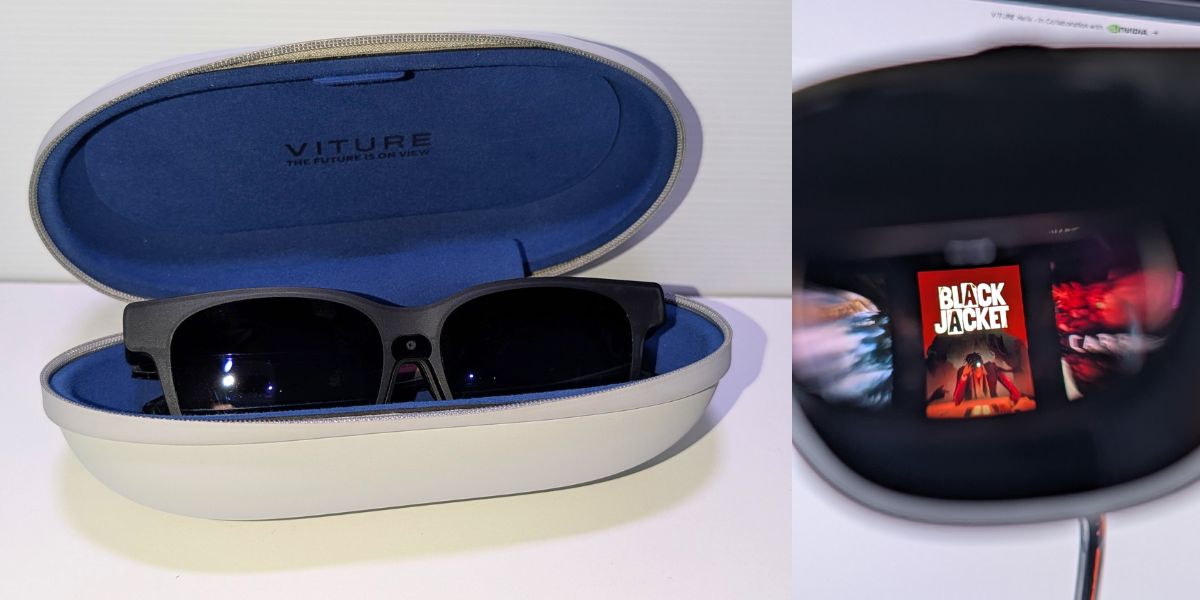
Imagine it is two in the morning. The Formula 1 is roaring around the track. You are wide awake, watching every hairpin turn on a massive cinema screen, yet your partner is sleeping soundly right next to you. No glaring light filling the room, no blaring noise waking the house. Just you and the race. This is not a distant science-fiction dream; this is what it is like to use the Viture Luma Pro XR Glasses.
Why Do These Even Exist?
Virtual reality is incredible, but it tends to completely isolates you from the world around you. Enter XR (Extended Reality) glasses. Viture designed the Luma Pro for people who want the luxury of a giant cinema screen or a multi-monitor workstation, but squeezed into a form factor that closely resembles a slightly chunky pair of sunglasses.
They exist to solve a modern problem: we want our entertainment and our workspaces to be massive, but we want our actual devices to be small and portable.
How They Work (And What They Do Well)
Instead of complicated setups and external cameras, these glasses simply project a crisp, enormous virtual screen directly into your line of sight.
At the heart of the Luma Pro is Sony’s latest micro-OLED panels, delivering a 1200p resolution per eye (1920×1200). This change to a 16:10 aspect ratio provides more vertical breathing room than traditional 1080p displays.
In practice, the visual fidelity is striking. The display achieves a peak perceived brightness of 1000 nits, which is bright enough to cut through moderately lit environments while maintaining deep, inky blacks that only OLED can provide. Unlike earlier models that struggled with horizontal “electrical ripple” artifacts or banding in subtle gradients, the Luma Pro offers an incredibly clean, stable image. With a field of view expanded to 52 degrees, the perceived screen size reaches roughly 150 inches at 4 metres. It is remarkably sharp from edge to edge, free of the “screen door” effects or grid patterns that often plague early-generation AR hardware.
Whether you are streaming a film or working on a spreadsheet, the color accuracy is punchy and lifelike. Viture also included five built-in color presets (True Color, Vivid, Film, Warm, and Cool), allowing you to tune the display to your personal preference without needing complex software calibration.
As someone who is nearsighted (around a -2.7 prescription), my biggest worry was whether I would be able to see the screen at all. Usually, this means messing around with contact lenses or ordering expensive, custom magnetic prescription inserts. Thankfully, Viture included built-in myopia adjustments. While the numbers on the focus dials did not perfectly match my exact prescription on paper, a few quick turns brought everything into razor-sharp focus. The image was so clear that I could easily set up multiple virtual screens and tackle daily computer work tasks without any eye strain. It is a massive win for productivity.
Over the last few weeks, these glasses became my default screen. I plugged them into my Steam Deck and burned through hours of Batman Arkham Asylum, Black Jacket, Metro Exodus, and Sonic Racing Crossworld. The colours pop, the text is legible, and the response time keeps up with fast-paced action.
When Netflix dropped the new episodes of Resident Alien, I streamed them lying completely flat in bed. The built-in directional audio is brilliant, it delivers clear sound straight to your ears while remaining almost completely silent to anyone sitting right next to you. I also used the SBS app to watch the Australia versus Paraguay World Cup match, and having a stadium-sized screen with you anywhere you go is a surreal experience.
The Quirks
No technology is perfect, and testing the limits revealed a few small hurdles.
I used the Viture dock to hook the glasses up to a PlayStation 5, aiming to play F1 2025 (with the 2026 update) using a Logitech racing wheel. Visually, it was an awesome experience, but my brain kept tricking me. Because the screen is so large and immersive, I found myself physically turning my head to check my blind spots on the track. However, because the Luma Pro projects a fixed screen in front of you, the screen simply moves with your head. If you want true look-around immersion, you still need a dedicated PlayStation VR headset.
I also tested it with the new Nintendo Switch 2. The visual experience is fantastic, but there is a slight design oversight. When you attach the console to the dock and send the signal to the glasses, the machine assumes it has been placed in its physical living room dock. This instantly disables any attached Joy-Cons, forcing you to physically detach them from the sides of the console to keep playing or use a pro controller. It is a minor inconvenience, but one you need to be aware of if you are getting these specifically for this console.
The Competition
When compared to other alternatives like the XReal One Pro or Lenovo Legion Glasses Gen 2, the Luma Pro holds its own beautifully and even surpases in areas where its features are compared. Some glasses just show a screen, what we are dealing with here is a more complete experience.
The Viture lineup is currently led by “The Beast,” which offers a larger 174-inch FOV and impressive 3DoF (three degrees of freedom) head tracking built directly into the frames. However, The Beast notably lacks the focus dials found on the Luma Pro. For those who wear glasses, the Luma Pro’s built-in myopia adjustment is arguably a more “essential” feature than the extra screen size of The Beast.
Viture has focused the Luma Pro’s on making the display look like a high-end OLED monitor.
The Final Verdict
Are the Viture Luma Pro XR Glasses worth the investment? Absolutely.
They take the screens we rely on every day and make them private, portable, and remarkably comfortable. Whether you want to work across three monitors in a busy cafe, play the latest games on a flight, or just watch television in bed without disturbing your household, they deliver exactly what they promise. Highly recommended.